
Die gewählte Schnittstelle beeinflusst mehr als nur die Übertragungsgeschwindigkeit. Sie entscheidet darüber, ob Ihr Marken-Stick einen starken oder einen frustrierenden Eindruck hinterlässt. USB 2.0 und USB 3.0 sind nicht austauschbar, sobald echte Dateien und echte Empfänger im Spiel sind.
Hier ist die Kurzversion. Wählen Sie USB 2.0 für interne Sticks, die kleine Dateien tragen – Dokumente, PDFs, Onboarding-Pakete – wenn Ihr eigenes Team das Publikum ist. Wählen Sie USB 3.0, wenn der Stick große Dateien wie Videos, Software oder Designarbeiten enthält oder wenn er an einen Kunden, Investor oder Veranstaltungsteilnehmer geht, dessen erster Eindruck zählt. Je größer die Dateien und je externer das Publikum, desto mehr zählt die Schnittstelle.
YOUSAN ist eine direkte USB-Stick-Fabrik und produziert seit 2011 individuelle Sticks. Sie erhalten vor der Produktion ein kostenloses 3D-Mockup, einen Prototyp in nur 3 Tagen, Speicherchips der Güteklasse A, die für jahrelange zuverlässige Nutzung gebaut sind, kostenloses Vorladen von Daten und vollständige Exportzertifizierungen (ISO9001, SGS, RoHS, CE, BSCI). Sowohl USB 2.0 als auch USB 3.0 werden in jeder Menge versendet. Teilen Sie uns Ihre Dateigröße, Ihre Empfänger und Ihre Menge mit, und Sie erhalten innerhalb von 24 Stunden ein Angebot direkt von der Fabrik.
USB 2.0 vs. USB 3.0 auf einen Blick
| Faktor | USB 2.0 | USB 3.0 |
|---|---|---|
| Übertragungsgeschwindigkeit | Langsamer – bei großen Dateien spürbar | Bei großen Übertragungen um ein Vielfaches schneller |
| Beste Dateigröße | Unter ~500MB pro Stick | Mehrere Gigabyte pro Stick |
| Idealer Inhalt | Dokumente, PDFs, kleine Konfigurationsdateien | Videos, Software-Images, Designdateien, große Datensätze |
| Beste Zielgruppe | Interne Teams in einer kontrollierten Umgebung | Kunden, Investoren, Eventbesucher, Partner |
| Relative Großhandelskosten | Geringere Stückkosten | Etwas höher pro Stück |
| In einem älteren USB-2.0-Anschluss | Läuft mit voller Geschwindigkeit | Fällt auf USB-2.0-Geschwindigkeit |
Nutzen Sie diese Tabelle als schnelle Referenz und lesen Sie weiter zu den Praxis-Szenarien, die jeden Fall entscheiden.
Wie sich der Geschwindigkeitsunterschied im echten Einsatz anfühlt
Rohe Zahlen in Megabyte pro Sekunde sagen wenig über die tatsächliche geschäftliche Nutzung aus. Entscheidend ist der Unterschied, den Sie in zeitkritischen Situationen spüren.
Stellen Sie sich vor, Sie möchten ein 2-GB-Produktdemonstrationsvideo 30 Minuten vor einem Kundentermin auf 10 Sticks kopieren. Mit USB 2.0 sehen Sie, wie die Fortschrittsleiste kriecht. Nach fünf Minuten wartet Ihr Team immer noch. Dieselbe Aufgabe in weniger als 2 Minuten mit USB 3.0, und Sie haben noch Zeit zum Packen. Eine Schnittstelle macht die Vorbereitung stressig. Die andere macht sie normal.
Je größer die Datei, desto größer der Unterschied. Produktvideos, Software-Abbilder und sogar Video-Schulungsmaterialien bremsen USB 2.0 aus – USB 3.0 hingegen nicht.
Denken Sie daran, wo der Stick am Ende landet
Die wichtigste Frage vor einer Großbestellung ist nicht die Frage nach dem Stick. Es geht darum, wer ihn einsteckt.
Die interne Verwendung bleibt in einer Umgebung, die Sie kontrollieren. Wenn die Konfigurationsdateien mit anderen IT-Mitarbeitern geteilt werden, weiß das IT-Team, welche Hardwarekonfiguration am anderen Ende vorhanden ist. Diese Sticks werden nicht an Kunden übergeben, sondern an Mitarbeiter von einer HR-Abteilung, die Onboarding-Dokumente lädt. Sie sind der Eigentümer der Situation. Geschwindigkeit hilft, aber sie trägt nicht den Ruf Ihrer Marke.
Alles ändert sich mit externer Nutzung. Sie können die Erfahrung nicht kontrollieren, sobald sie auf dem Laptop eines Kunden oder in der Tasche eines Investors ist. Wenn Ihr Kunde wartet, während ein langsamer Stick arbeitet, hat er oder sie bereits eine Meinung über Ihr Unternehmen, bevor die erste Folie angezeigt wird. Diese Meinung lässt sich kostenlos vermeiden – und sie beginnt mit einer Schnittstelle, die Sie wählen.
Wo USB 2.0 immer noch seinen Job erfüllt
Nicht jede Bestellung muss mit maximaler Geschwindigkeit laufen. USB 2.0 ist keineswegs ein veralteter Standard. Es eignet sich für den internen Gebrauch, bei dem die Dateien klein bleiben und der Endnutzer die Schnittstelle nie in Betracht zieht.
Das ist die normale Arbeit einer Personalabteilung. Ein Koordinator muss neue Mitarbeiter-Handbücher, Vorteilsformulare und PDFs von Richtlinien auf eine Charge von Sticks für den Orientierungstag übertragen. Die Dateien sind nicht zu groß. Die Übertragung dauert Sekunden. Mitarbeiter schließen an, öffnen ein PDF und machen sich an die Arbeit. Niemand wartet. Die Schnittstelle bleibt unsichtbar, und der Stick tut genau das, was er tun soll.
Das gilt für interne Schulungs-PDFs, Abteilungskonfigurationsdateien und kleine Dokumentensätze, die zwischen Teams ausgetauscht werden. Wenn Ihre Dateien klein sind und Sie sie mit Personen innerhalb Ihrer Organisation teilen, ist USB 2.0 alles, was Sie brauchen.
Wo USB 3.0 seine Berechtigung hat
Wenn ein Stick mit Ihrem Logo Ihr Büro verlässt, wird die Schnittstelle Teil Ihrer Präsentation. Hier hört USB 3.0 auf, eine Spezifikation zu sein, und wird zur Markenentscheidung.
Stellen Sie sich einen Training-Manager vor, der Video-Onboarding-Kurse an Remote-Teams sendet. Jeder Stick enthält Stunden an MP4-Inhalten – mehrere Gigabyte pro Empfänger. Auf USB 2.0 wartet der Mitarbeiter, bis das Video geladen ist. Auf USB 3.0 startet die Wiedergabe schnell und die Arbeit wirkt professionell, bevor das erste Modul abgespielt wird.
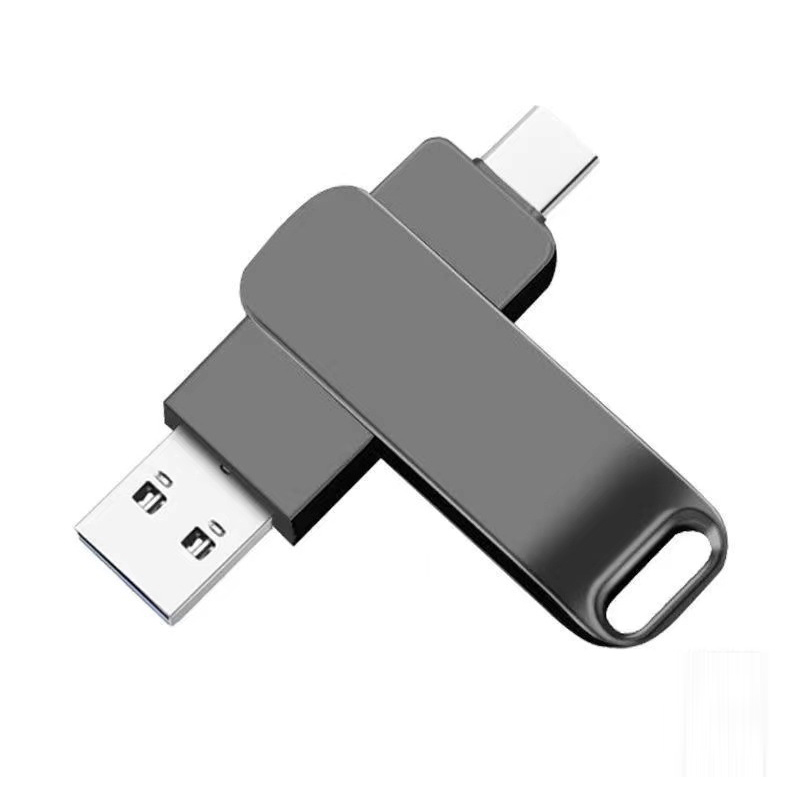
2-in-1-USB 3.0
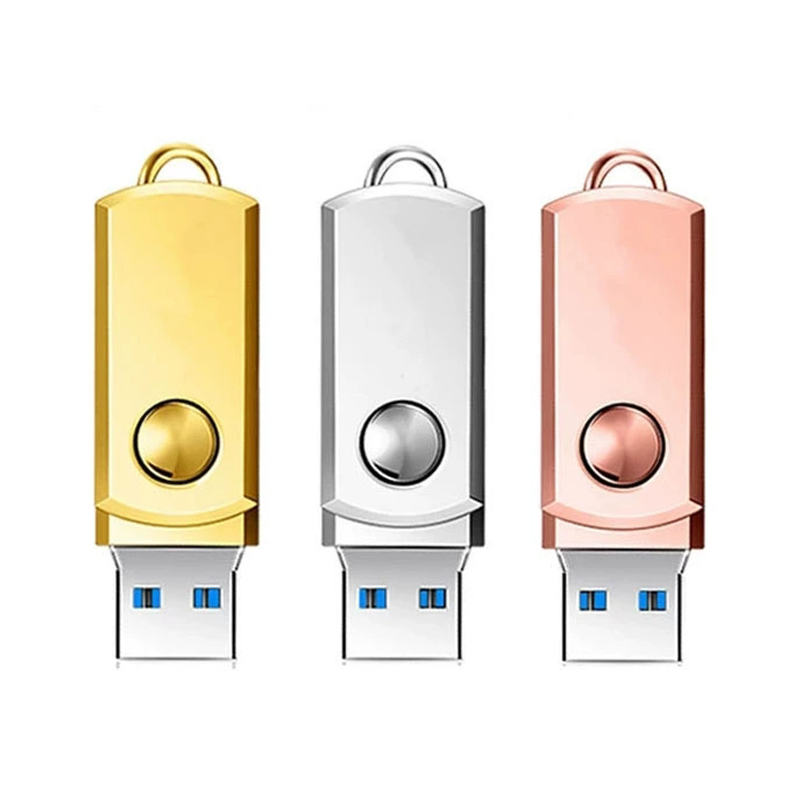
Metall-USB 3.0

affenförmiger USB 3.0
Führungskräfte, die Investoren Sticks mit Pitch-Videos und Finanzpräsentationen überreichen, stehen vor denselben Risiken. Ein langsamer Stick vor einem Entscheidungsträger wirft ein schlechtes Licht auf das gesamte Unternehmen, egal wie stark der Inhalt ist. USB 3.0 beseitigt dieses Risiko. Sie können das gesamte USB-3.0-Stick-Sortiment um die Optionen in dieser Oberfläche zu sehen.
Der Fehler, vor dem niemand warnt
Viele Unternehmen führen USB 3.0 als Standard im ganzen Unternehmen ein und stoßen dann auf etwas, das ihnen nicht gefällt. Ein USB-3.0-Stick, der an einem USB-2.0-Anschluss hängt, läuft mit USB-2.0-Geschwindigkeit.
Abwärtskompatibilität ist hilfreich – der Stick funktioniert an jedem USB-Anschluss. An einem langsameren Anschluss läuft er mit der Geschwindigkeit des Anschlusses und nicht mit der des Sticks. Wenn der Laptop des Empfängers älter ist, erlebt er dieselbe Leistung wie mit einem normalen USB-2.0-Stick. Das Upgrade bringt ihm in keiner Weise einen Vorteil.
Ein Unternehmen bestellte das folgende Set USB-3.0-Sticks für eine externe Marketingkampagne. Etwa die Hälfte der Empfänger hatte bereits einen 3-5 Jahre alten Laptop mit USB-2.0-Anschluss. Diejenigen, die den Stick erhielten, sahen keine schnelleren Geschwindigkeiten. Das Publikum war halb so groß, und das Unternehmen war 3.0.
Wenn Sie prüfen, ob Sie USB 3.0 bei einem Kunden oder für eine externe Kampagne einsetzen, stellen Sie sicher, dass Sie die Hardware Ihrer Empfänger überprüfen. Dies gilt besonders für die neueste Ausrüstung. Ziehen Sie in Betracht, dies zu prüfen, wenn Sie ein Unternehmen sind, das sich auf ältere Branchensegmente, Nicht-Technologieunternehmen oder längere Hardware-Aktualisierungszyklen konzentriert. Wenn Sie das Hardwareprofil Ihrer Empfänger vor der Bestellung kennen, wissen Sie, was Sie für das bekommen, was Sie bezahlen.
Ein einfacher Weg zur Entscheidung
Sie benötigen keine Formel. Drei Fragen klären es jedes Mal.
Wie groß sind die Dateien? Dokumente, PDFs und kleine Konfigurationsdateien übertragen sich auf beiden Schnittstellen schnell. Video, Software-Images und große Datenpakete sind der Bereich, in dem die Schnittstelle zählt. Unter etwa 500 MB pro Stick erledigt USB 2.0 die Aufgabe ohne Reibung.
Wer erhält den Stick – internes Team oder externer Empfänger? Interne Zielgruppen arbeiten in Umgebungen, die Sie kontrollieren. Externe Empfänger – Kunden, Investoren, Eventbesucher, Partner – beurteilen Ihre Marke in dem Moment, in dem sie den Stick einstecken.
Welche Hardware nutzt Ihr Publikum? Moderne Laptops und Desktops unterstützen USB 3.0 vollständig. Ältere Hardware nicht. Wenn Ihre Empfänger neuere Geräte verwenden, entfaltet USB 3.0 seinen vollen Nutzen. Ist das Hardwarealter uneinheitlich oder unbekannt, berücksichtigen Sie das, bevor Sie sich festlegen.
Arbeiten Sie diese drei Antworten durch, und die richtige Wahl wird klar. Für die genaue Preisdifferenz bei Großbestellungen lesen Sie unseren Kostenvergleichsleitfaden USB 2.0 vs. USB 3.0. Wenn Sie noch Budgets planen, unser Leitfaden zu wie viel individuelle USB-Sticks kosten schlüsselt die Preise nach Menge und Kapazität auf.
Was für ein Angebot senden
Für ein schnelles und genaues Angebot senden Sie bitte diese Angaben:
- Was Sie verteilen – Dateitypen und Gesamtgröße pro Stick
- Wer erhält den Stick – internes Team oder externe Empfänger
- Menge
- Die benötigte Kapazität – ein schneller Leitfaden zur Speicherkapazität hilft, wenn Sie unsicher sind
- Schnittstellenpräferenz, oder das Team um eine Empfehlung bitten
- Ihre Logodatei
- Verpackungspräferenz
- Frist
Auf dieser Basis erstellt YOUSAN ein kostenloses 3D-Mockup und ein Direktangebot ab Werk und berät zur passenden Schnittstelle für Ihren Anwendungsfall.
Bereit, den richtigen Anschluss zu bestellen?
Sagen Sie uns, was Sie verteilen und wer es erhält. Kontaktieren Sie YOUSAN und erhalten Sie innerhalb von 24 Stunden ein Angebot direkt ab Werk – USB 2.0 und USB 3.0 in jeder Menge verfügbar.

Kartenförmiger USB-Stick
SKU:KP-20
Für Geschwindigkeitsbegeisterte und designorientierte Anwender konzipiert, dieser personalisierte USB3.0- Kreditkarten-USB-Stick Die USB-Sticks verfügen über eine USB-3.0/3.1-Gen-1-Schnittstelle (Lesegeschwindigkeit 120 MB/s), ein robustes, lebensmittelechtes Eco-ABS-Gehäuse und unendliche Individualisierungsmöglichkeiten – sie verwandeln Datenspeicherung in ein elegantes, stilvolles Erlebnis.
FAQ
Gibt es noch Computer mit USB 2.0?
Ja. Jedes moderne Notebook und jeder Desktop-Computer verfügt weiterhin über USB-2.0-Anschlüsse, und es gibt keine Kompatibilitätsprobleme. Für kleine Dateien und interne Empfänger funktioniert USB 2.0 auf aktueller Hardware exakt wie erwartet.
Funktioniert ein USB-3.0-Stick an einem USB-2.0-Port?
Ja, aber in diesem Anschluss läuft er mit USB-2.0-Geschwindigkeit. Der Stick ist abwärtskompatibel, verbindet sich also und funktioniert wie jeder andere Stick. Die volle USB-3.0-Geschwindigkeit erreicht er nur, wenn auch der Anschluss USB 3.0 unterstützt.
Wie groß ist der tatsächliche Geschwindigkeitsunterschied im Alltag?
Bei Dokumenten und PDFs werden Sie kaum einen Unterschied bemerken – beide Schnittstellen verarbeiten sie schnell. Der Unterschied zeigt sich bei großen Videodateien oder Software-Images. Eine Übertragung, die auf USB 3.0 etwa zwei Minuten dauert, kann auf USB 2.0 acht bis zwölf Minuten dauern. Dann verändert die Schnittstelle das Erlebnis.
Sollte mein Unternehmen für alle Bestellungen einen einheitlichen Anschluss standardisieren?
Das hängt davon ab, was Sie verteilen und an wen. Viele Unternehmen verwenden USB 2.0 für interne Dokument-Sticks und USB 3.0 für kundenorientierte oder medienlastige Sticks. Die Vereinheitlichung auf eine Schnittstelle ist nur dann sinnvoll, wenn Ihre Dateitypen und Anwendungsfälle über Bestellungen hinweg konsistent bleiben.
Woher weiß ich, welche Schnittstelle meine Empfänger benötigen?
Beginnen Sie mit den Dateien. Wenn der Inhalt schwer ist – Video, Software, große Datensätze – und die Empfänger extern sind, ist USB 3.0 die richtige Wahl. Wenn Sie sich bei der Hardware Ihrer Empfänger nicht sicher sind, lohnt es sich, dies zuerst zu prüfen. Das Team kann Ihnen auch helfen, vor der Finalisierung Ihrer Bestellung die richtige Wahl für Ihren Anwendungsfall zu treffen.

 Deutsch (Österreich)
  English
  Español de México
  Italiano
  Русский
  Français
  Türkçe
  Bahasa Melayu